Features
From real-time alerts to historical analysis, our platform is built for reliability.
.jpeg?alt=media&token=4a88fd95-4b6b-4b8a-afcc-bdea0a182e53)
.jpeg?alt=media&token=00647e9d-de47-49e2-8e19-1a9572937791)
.jpeg?alt=media&token=39a9e009-634a-403b-8beb-574bc2f16bf1)
.jpeg?alt=media&token=c56f238b-27e1-4263-b41c-5120a02ff4e8)
Real-time Alarm Monitoring
- Instant push notifications
- Active alarm tracking
- Detailed historical logs
- Customizable alarm labels
Cybersecurity & Standards
Our system is designed according to the latest industrial IoT security principles to ensure your data remains private and protected.
EN 18031 Compliance
ISO 27001 & SOC 1/2/3
- EN 18031 (EU) Compliant
- Certified Firebase Infrastructure (ISO 27001, SOC 1/2/3)
- Standard NIST Security
- TLS 1.3 Encryption
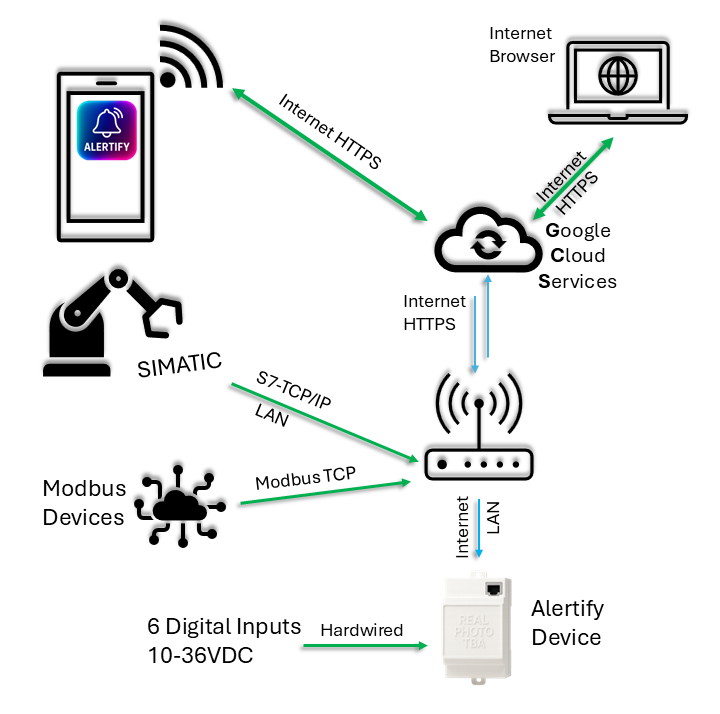
System Architecture
- Industrial-grade hardware
- Secure Firebase Cloud connection
- Encrypted data transmission
- High-availability monitoring